

Account changes
Part of step 3. This used to be a button called Account continuity. It is now the Account changes queue on Accounts & owners.
What this is for
Section titled “What this is for”Accounts get renumbered. A bank converts its systems, a card is reissued after fraud, an institution is acquired. The account is the same account, but the statements carry two different numbers, so Ordernize files them as two accounts, and your coverage looks like two half-populated histories instead of one continuous one.
Linking the old number to the new one puts both sets of statements in a single account folder, so they read as one history.
When you do it
Section titled “When you do it”In the same sitting as the rest of the accounts and owners step. Look for an Account changes tab on Accounts & owners; the number on it is how many suggestions are open.
The tab is only there when there is something to do. It is optional and never blocks Continue — the queue says as much at the top: “Suggestions are optional and can be reviewed later.”
Do not confuse it with Possible duplicates, the tab beside it. That one is for one account number sitting in two folders under different names. This one is for one account whose number changed. See Merging duplicates.
- Accounts & owners → the Account changes tab.
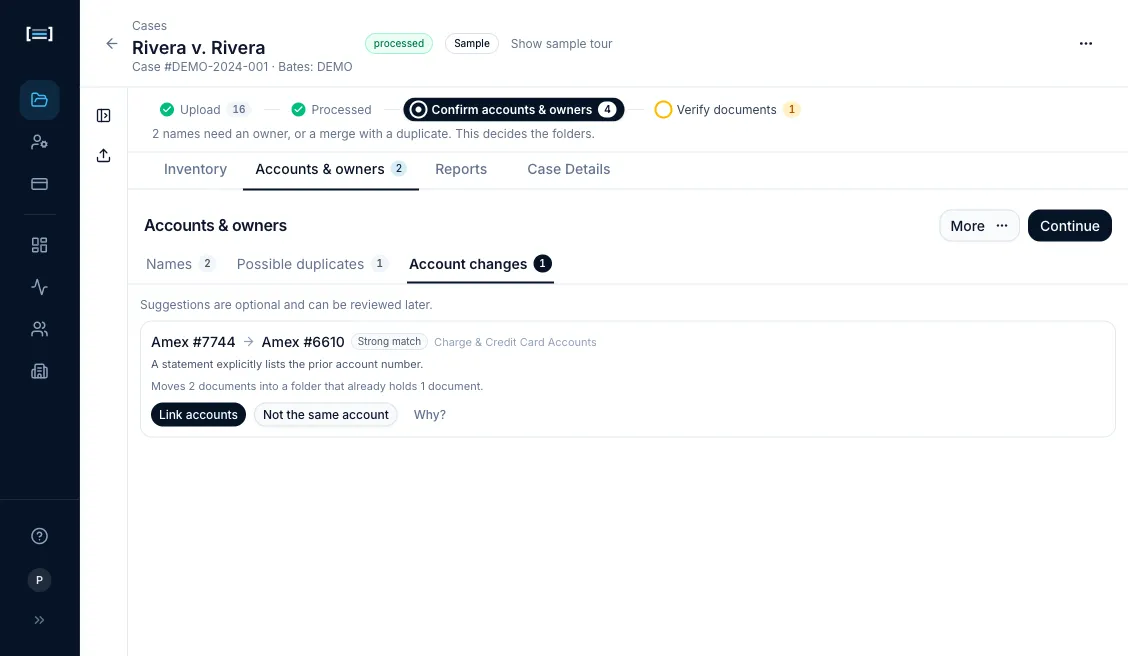
- Read the suggestion. Each row gives you:
- the two accounts, old → new (
Amex #7744→Amex #6610) - how strong the match is, in words: Strong match or Likely match
- the category the accounts sit in
- the one reason that decides it, for example “A statement explicitly lists the prior account number.”
- what linking would do, in documents: “Moves 2 documents into a folder that already holds 1 document.”
- a warning when the two accounts have different owners
- the two accounts, old → new (
- Check the evidence yourself. Why? opens the remaining signals and the filenames on both sides; click a filename to open the document. The reason line tells you how strong the basis is: a statement that literally prints “formerly account ending 7744” is very different from a match inferred from timing and balances.
- Decide. Link accounts opens a confirmation that names the movement, the effect on coverage and the Inventory of Documents, and the folder rebuild. Confirm it there. Not the same account dismisses the suggestion outright, with no confirmation, because dismissing one moves nothing.
After you confirm, the row says “Linking — rebuilding folders”. This usually takes a few seconds, longer on a large case, and you can keep working while it runs. If it fails, the row says so and offers Retry in place of a silent failure.
Undoing a link
Section titled “Undoing a link”Confirmed links are listed under Linked accounts, in two places: at the foot of the Account changes queue, and under More → Linked accounts once the queue itself has gone.
Each shows old → new with the old number struck through, and an Undo link button. Undo asks you to confirm, then splits the folders back apart.
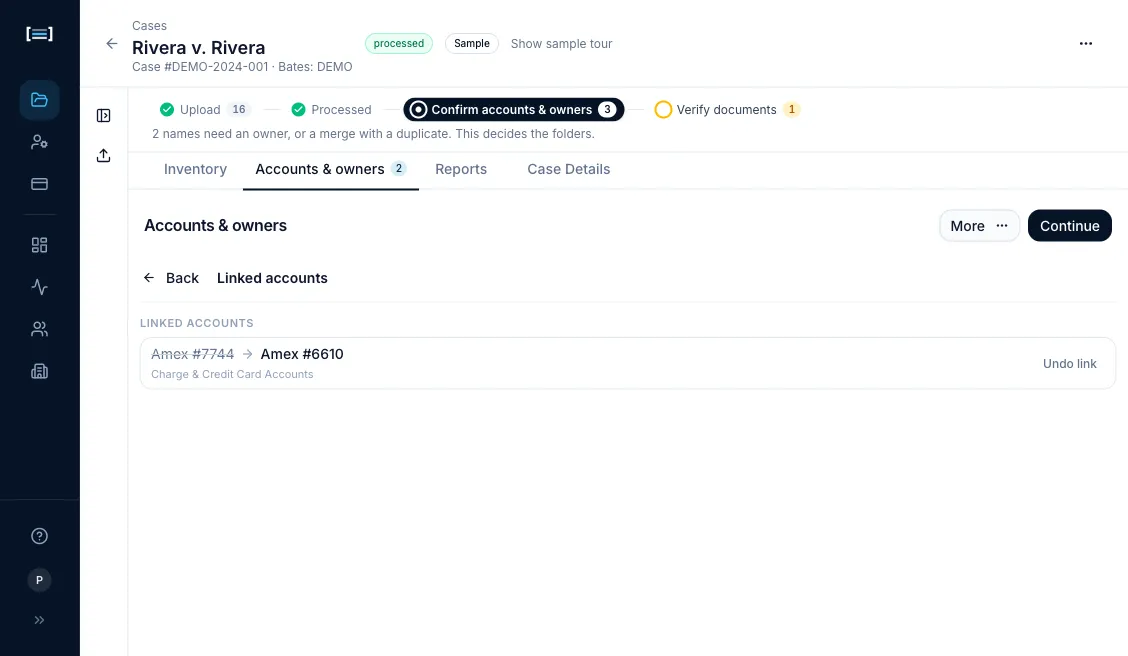
More → Linked accounts only appears in the menu once at least one link is confirmed, and carries a count when it does. That is the path to use after the suggestions are gone: resolving the last suggestion removes the Account changes tab, but not your ability to undo what it did.
What good looks like
Section titled “What good looks like”- One account folder holding the full statement run across the renumbering.
- Coverage for that account reads as a single continuous period instead of two partial ones.
Next: Maintaining names · Exporting