

Case details
What this is for
Section titled “What this is for”Everything about the case itself rather than its documents: the party names, the attorneys, the issue list, and deleting the case.
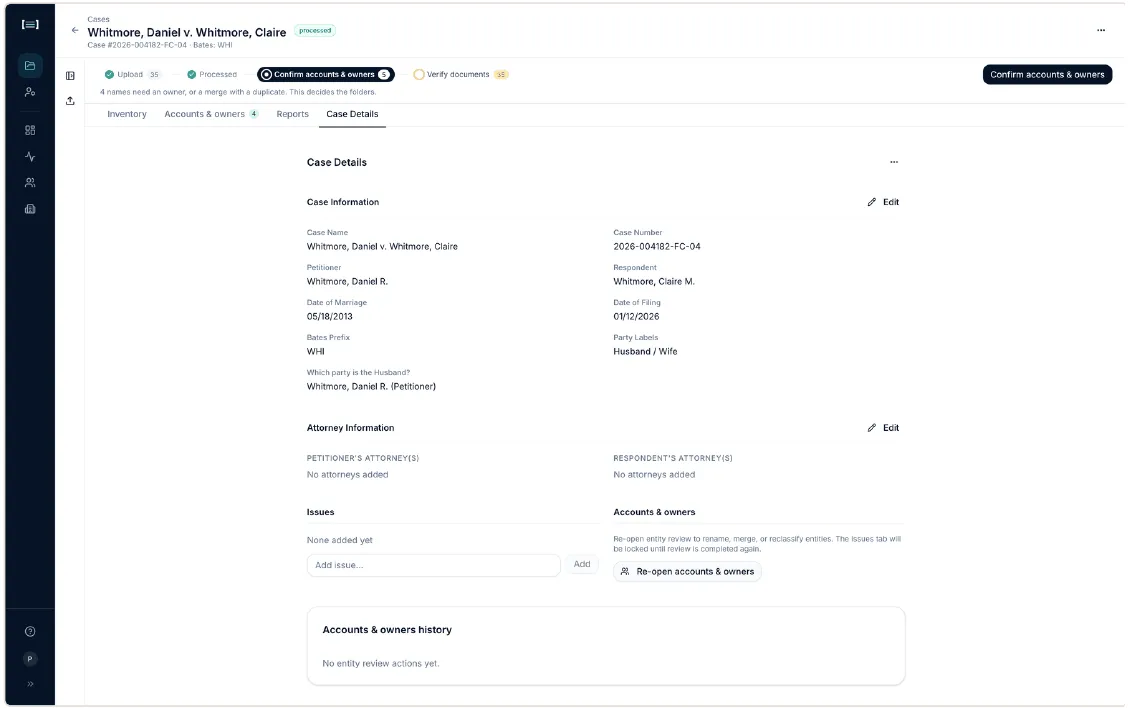
Case Information
Section titled “Case Information”The fields from case creation: case name, number, petitioner, respondent, party labels, dates, Bates prefix. Click Edit to change them.
Correcting a party name here matters more than it looks: party names are how documents get labelled Husband / Wife / Joint. Fixing a misspelling can re-attribute documents across the case.
Attorney Information
Section titled “Attorney Information”Counsel for each side. Used on generated correspondence and request letters.
Issues
Section titled “Issues”Case-specific issues you can tag documents against, beyond the 22 standard categories. Useful when a matter has a theme that cuts across categories (a specific transfer, a disputed asset) and you want to pull those documents together regardless of where they are filed.
Add the issue here, then tag documents from the document panel.
Accounts & owners
Section titled “Accounts & owners”A summary of where Accounts & owners stands, and a way to reopen it after it has been marked complete.
Danger zone
Section titled “Danger zone”Delete case removes the case and its documents. It asks you to confirm by typing. There is no undo.
Next: Exporting