

Exporting reports
After the four steps.
What this is for
Section titled “What this is for”Turning the case into the things you actually hand over: the Inventory of Documents workbook, and the document files themselves organised into folders.
Before you export
Section titled “Before you export”Run down this list. Everything here is easier to fix now than after the inventory has gone out:
- Case status reads processed
_UNSORTED -- Needs Reviewis empty- Documents you rely on are Verified
- Accounts & owners is finished. This is the one people skip.
- Duplicate institutions, entities and properties are merged
- Renumbered accounts are linked
If owners are still unclassified, the Deliverables tab warns you and offers a button straight back to Accounts & owners. That warning is worth obeying. It means documents are about to be filed somewhere you have not confirmed.
- Open the Deliverables tab.
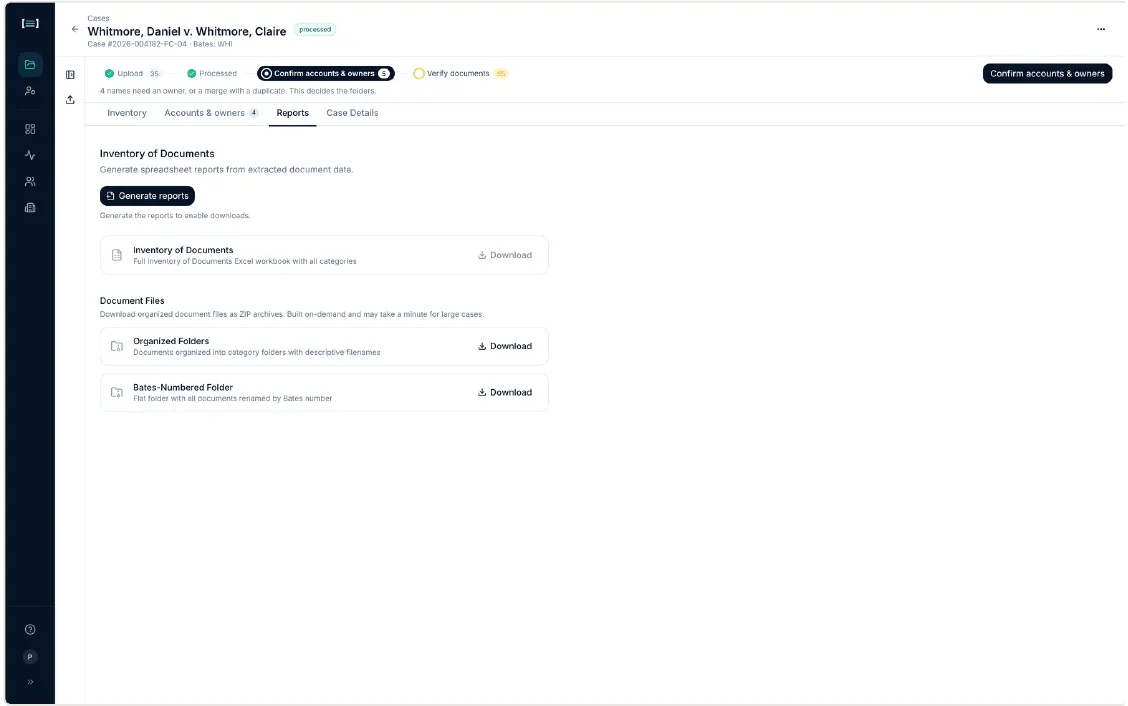
- Click Generate reports. Downloads stay disabled until you do.
- Download what you need.
| Output | What it is |
|---|---|
| Inventory of Documents | The IOD Excel workbook: every category, every document, Bates numbers, owners, descriptions |
| Organized Folders (ZIP) | The document files in category folders, with descriptive filenames |
| Bates-Numbered Folder (ZIP) | One flat folder, every file renamed to its Bates number |
The two ZIPs are built on demand and can take a minute on a large case.
What good looks like
Section titled “What good looks like”Open the workbook. It should read as the inventory you would have produced by hand: categories in order, an entry per document, Bates numbers running cleanly, descriptions that say what each document is.
Spot-check three things:
- an account you know well: are all its statements together under one institution spelling?
- a related entity: did its documents land under the entity, not scattered?
- the Bates run: continuous, no gaps?